
The first product version has a more urgent job: prove that the product works, win users and give the startup something it can sell, demo or raise money on. That’s a reasonable priority. Nobody wants to spend six months preparing a product for markets it may never enter.
The problem starts when the MVP quietly becomes the real product.
A customer asks whether the software application is available in German. A partner wants a Spanish version for a reseller channel. A potential investor asks about global expansion. Someone suggests “just translating the UI” and then the product starts exposing technical assumptions that were never visible in English.
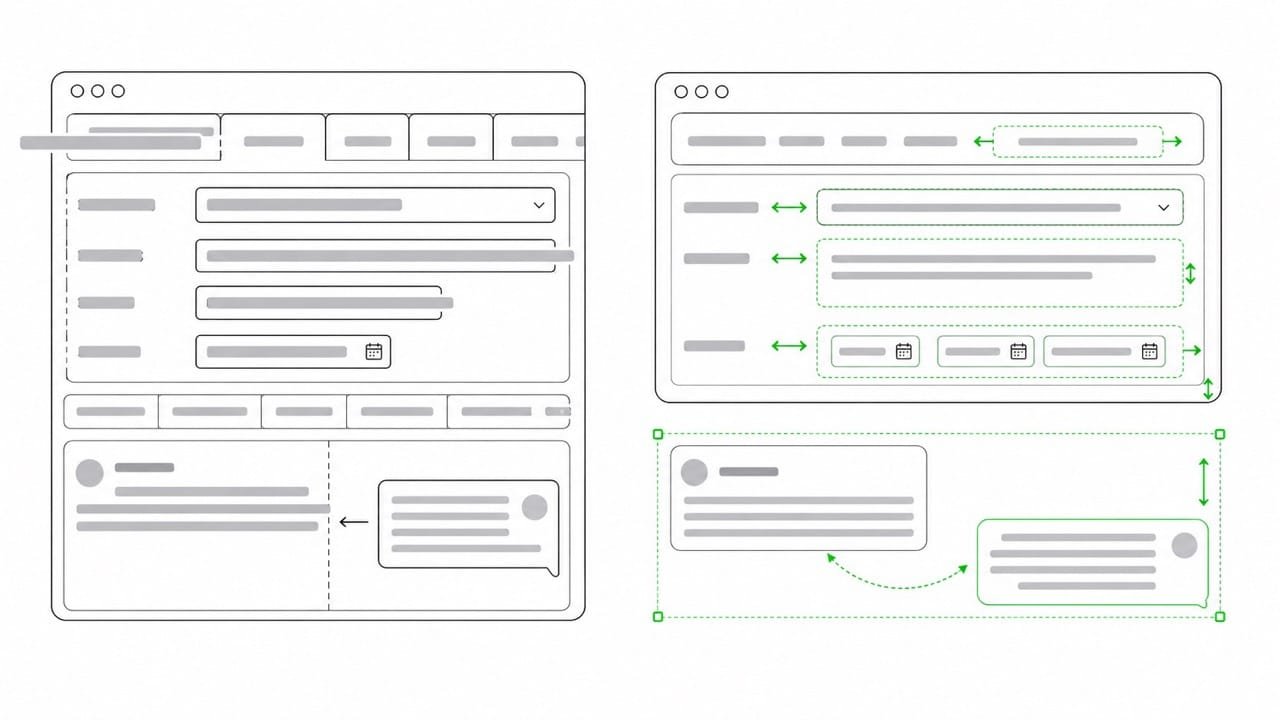
The text is hard-coded in the source code. The user interface only works with short English labels. Dates follow one locale. The calendar assumes one market. The translation management system can’t receive half the strings. A button that looked great in English appears all wonky when the German translation gets plugged.
This is where software internationalization comes in.
Often shortened to i18n, it’s the work that makes software ready for localization before the first serious localization project starts. It doesn’t equate to translating the product into every language from day one. But it does mean building a product so that translation, localization and market adaptation don’t require a nasty engineering cleanup later on down the road.
The software internationalization process isn’t the same as localization
In startup conversations, translation, localization, internationalization and globalization often get thrown into the same messy bucket: “going international.”
That causes problems.
Translation changes words. Localization adapts them for a specific target market, target language and target audience. Software internationalization prepares the product so that localization can happen without rewriting half the application. Globalization, by the way, is the broader business decision to serve customers across markets.
This distinction matters because a startup can translate an interface and still deliver a poor user experience.
I’ve seen this in so many software and web projects: the words are technically in another language, but the product still “thinks” in English. Sentence fragments don’t fit together. Placeholders are unclear. Formatting looks weird. The UI feels cramped. Help text appears in one language while system messages appear in another, and so on.
All of these issues point to an internationalization problem that showed up too late, not to translation problems.
A root cause is often hard-coded text during software development
Hard-coded interface text is common in early prototypes. It’s not pretty, but it happens, especially when you’re iterating fast.
If user-facing text lives inside the source code though, localization becomes dependent on developers for every small language change. Translators can’t work cleanly in that case, because they have to hound the localization engineers to chase individual strings. Product managers can’t see what’s been translated either. The whole localization process slows down before anyone has even properly started to localize.
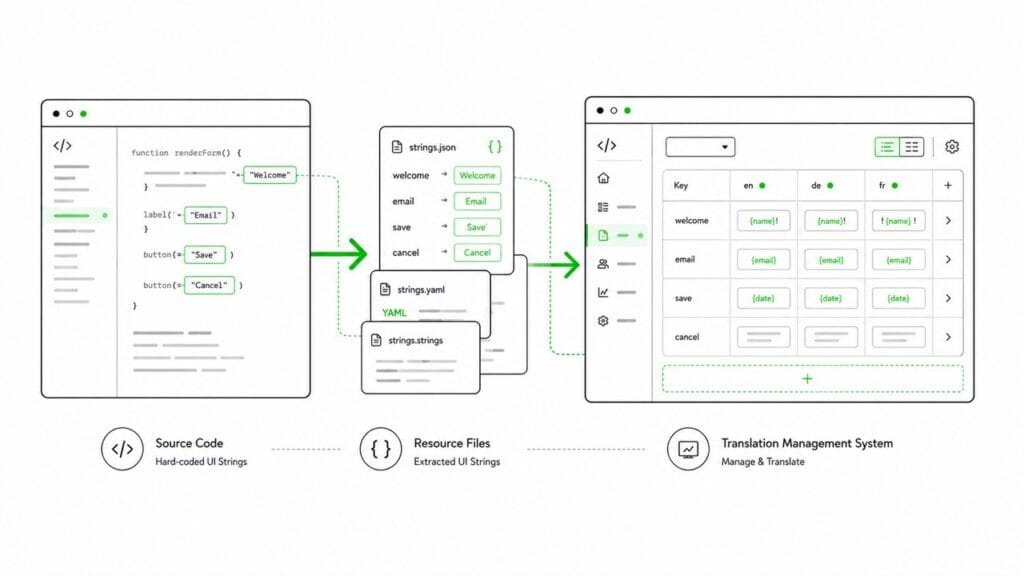
A better setup for best practices separates translatable text from the code. Strings live in resource files or a localization management system where they can be exported, translated, reviewed and updated. Depending on the stack, those files might use JSON, YAML, PO, XLIFF or another format.
The exact file format matters less than the principle: text that users see should be reachable by the people who need to translate and review it.
This is one of the simplest i18n decisions to make early on. It’s also one of the most annoying to fix later if you don’t!
Placeholders and sentence fragments create bad translations
Placeholders look harmless until they reach another language.
A string like “Hello, {name}” is simple. A string like “Your {plan} renews on {date}” already needs more care. A string built from fragments such as “Your” + plan name + “renews on” + date can turn into a hot mess.
English lets software teams get away with lazy string handling. Other languages don’t.
Word order changes. Grammar changes. Plurals change. The translator may need to move the placeholder to another position. Some languages need different forms depending on number, gender, case or context.
Overall, concatenation is a common localization trap. It may make the source code look tidy, but it results in an amateur looking translated product.
The practical rule here is simple: keep full user-facing messages as complete translatable units. Use placeholders where needed, but give translators enough context to understand what each placeholder represents.
UX and the product experience
Formats look like detail work until they appear in the wrong market.
Date and time formats, number formats, currencies, calendars, addresses and phone numbers all affect whether software feels trustworthy. A user shouldn’t have to guess whether 03/04 means 3 April or 4 March. A billing screen shouldn’t look as if it were built for one country and then lightly translated for everyone else.
I’ve written about locale-aware formatting in other posts and it’s a core part of software internationalization. Apps need to know which conventions belong to which market. One and the same product likely needs different display logic for English and Japanese, German and US English, or Arabic and French.
This is just basic product hygiene, not fancy enterprise polish, because these details typically show up in the most important places: during onboarding, at checkout, in the account settings, on invoices, notifications and dashboards. These are exactly the spots where users are going to be the least forgiving.
The UI has to survive longer words and different scripts
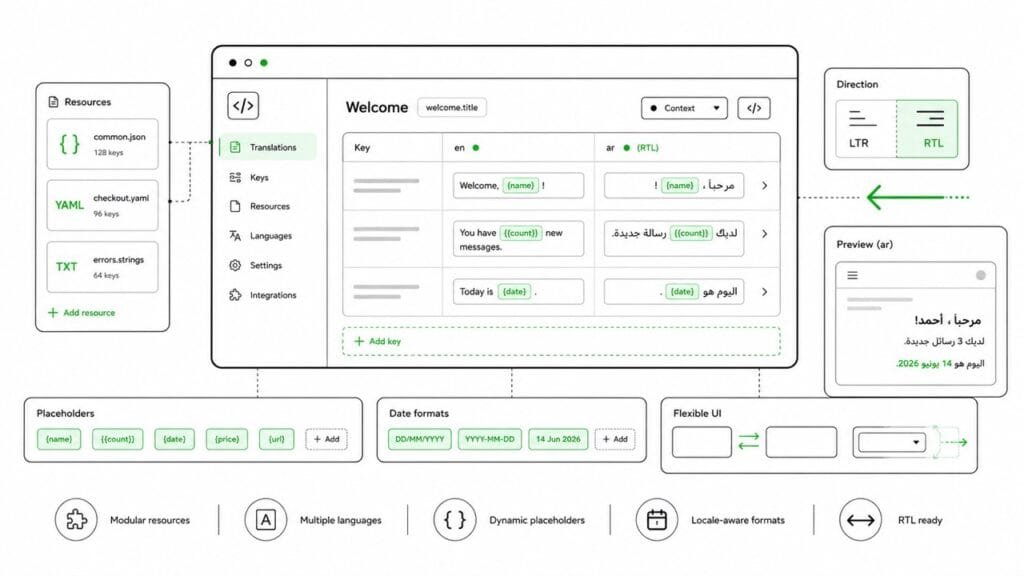
In a nutshell, the UI is where weak internationalization becomes most visible.
English labels are usually short. German gets notoriously longer. French may also need more space. Japanese may use fewer characters but expect different layout patterns. Unicode is a must. Urdu, Farsi, Hebrew or Arabic obviously require right to left support. Speaking of which, mixed left to right and right-to-left content can create bidirectional display issues, especially when numbers, brand names or code snippets appear inside the same sentence.
An early product doesn’t need to support every writing system on day one. But it should avoid UI decisions that make future localization unnecessarily painful.
Fixed-width buttons, cramped navigation, tiny cards, rigid tables and labels baked into images all create problems, too. A design that only works in English simply isn’t ready for a global market.
Internationalization belongs in product planning
By now it’s apparent that treating software internationalization as an engineering detail is too narrow.
It affects product decisions, design decisions and the development process itself:
- Founders need to understand the trade-offs.
- Product managers need to know when a feature creates localization debt.
- Designers need to accommodate for different languages and cultural preferences.
- Developers need to avoid hard-coding, weak encoding assumptions and brittle string logic.
- Translators need context.
- Localization engineers need a workflow that doesn’t depend on emergency fixes.
None of this requires a huge localization program. No startup needs an enterprise ceremony before it has product-market fit. But again, the basics should be in place before international growth becomes urgent.
Machine translation doesn’t fix i18n debt
AI and machine translation have made the translation and software localization process faster, but they haven’t removed the need for internationalization.
Machine translation can translate a string, but it won’t fix a broken placeholder. It can’t make a cramped UI flexible, either. Nor can it extract hard-coded text from the source code, decide whether a date format is appropriate for a specific target market, or turn sentence fragments into a clean localization workflow.
This is where bootstrapped SaaS and tiny founder-led startups can get misled. Translation looks like the expensive part, so automation seems like the most plausible solution. But when it comes to web applications and software, the real cost often sits outside the actual translation in engineering fixes, messy QA cycles, broken layouts, missing strings, unclear context and rework on the design and development side.
A good translation management system or TMS helps for sure. So do machine translation and human-led translation services. But none of them can replace the need to internationalize software properly.
Internationalize your software to prevent cleanup work
International expansion doesn’t always happen in the clean sequence people like to put into slide decks.
A customer appears in one market. A sales opportunity in another. One partner wants the product in two languages. A founder needs a demo for a region nobody had planned for six months earlier.
Good i18n as a baseline means more room to move in all of these scenarios. Each target market will still need product judgment, language quality and local context. But software internationalization means the product can adapt without turning every new locale into a re-engineering project.
This stuff isn’t glamorous, I know. Users won’t praise your resource files. They don’t care whether your encoding is clean, your placeholders are sensible or your UI can handle right-to-left text. But they most certainly notice the result.
