
OpenClaw Automation for Small Business: What to Build First
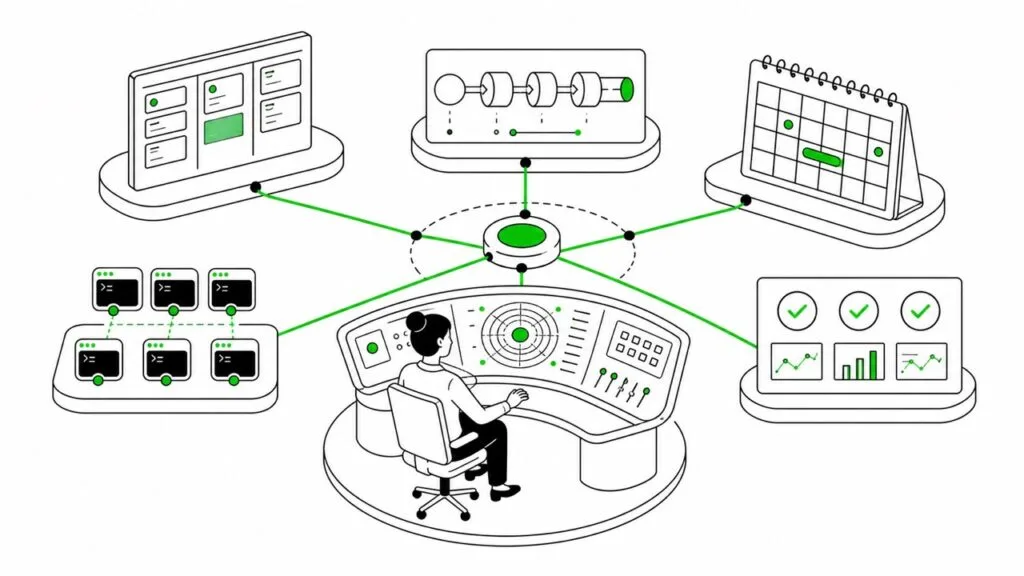
I’ve had an OpenClaw agent running 24/7 since early 2026. I use him mainly for internal operations: organizing work, processing research and keeping useful information from disappearing into the ether.
Fred has his own computer and his own accounts, but he doesn’t run my business per se.
He doesn’t communicate with my clients, publish my content or make important decisions without me.
What he does is handle a lot of the repetitive coordination and information processing that consumes time in a one-person business.
If another small-business owner asked me where to begin with agents though, I wouldn’t suggest jumping straight into automating email or setting up a fleet of scheduled jobs, no.
I would tell them to spec out a Mission Control and build that first.
A what, you say?
Mission Control is a personal OS for your business
Mission Control1 is the operating hub I built for my one-person business and team of AI agents.
It’s replaced my Asana subscription, allowed me to cancel my social media scheduling tools and became the place where I can see what’s happening across my operation. The best thing is that it’s all run locally. Nothing is in any cloud.
Its main features:
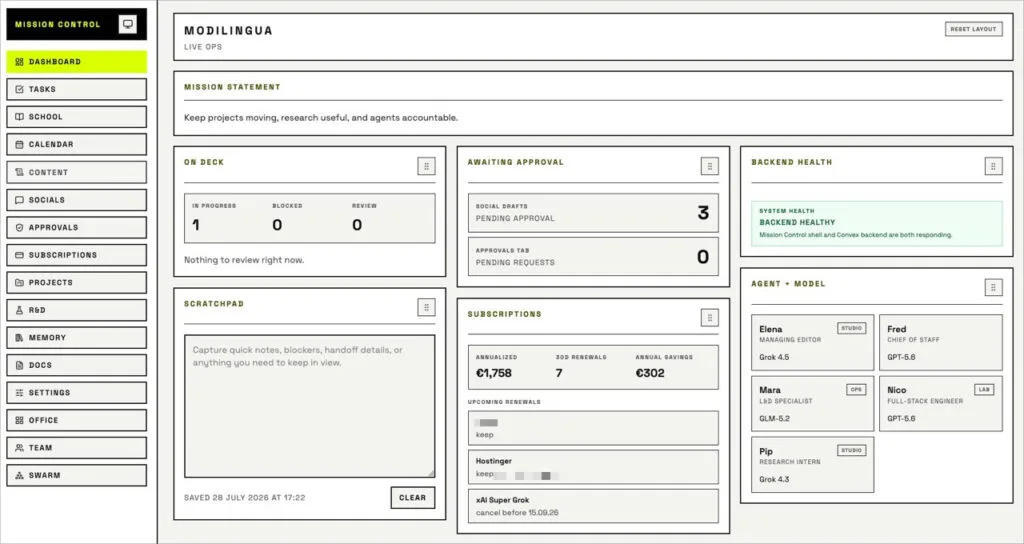
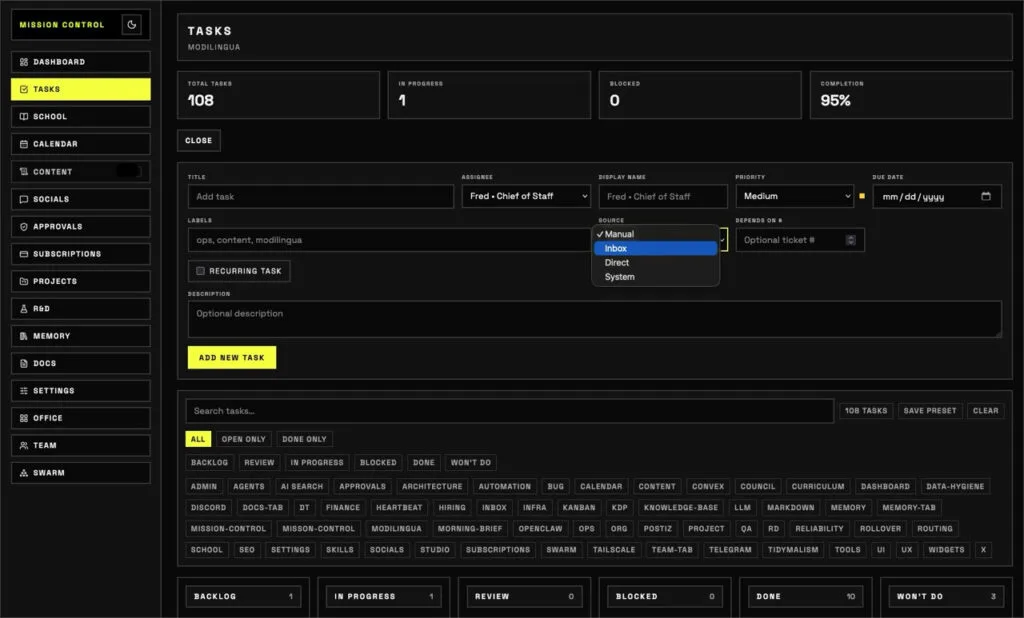
- a Kanban board for all task and project tickets;
- an integrated R&D hub for capturing and evaluating new ideas;
- content planning and social media scheduling;
- a record of active, paused and retired automations;
- an agentic team overview and their default models;
- a subscription cost tracker;
- a live view showing which agents are working and what they are working on;
- a live cron job dashboard;
- a separate agile projects area, with project stages, templates, linked tasks and scheduled jobs, and progress notes;
- an approvals inbox, where my main agent’s proposed actions can be approved, rejected or sent back for changes before being directly handed off as tasks;
- a coaching hub for custom-tailored courses and lessons my agents create just for me, based on my particular interests;
- a searchable memory and documents workspace with integrated Markdown viewer for daily notes, my agents’ dreams, reference materials, and past work;
- workspace settings and organizational rules, including our overall mission and team structure;
- swarm health, which shows whether multi-agent work is active and healthy;
- a customizable Home dashboard with widgets showing current workload, pending approvals, subscriptions renewing this month, system health and a scratchpad where I can drop ad-hoc notes-to-self.
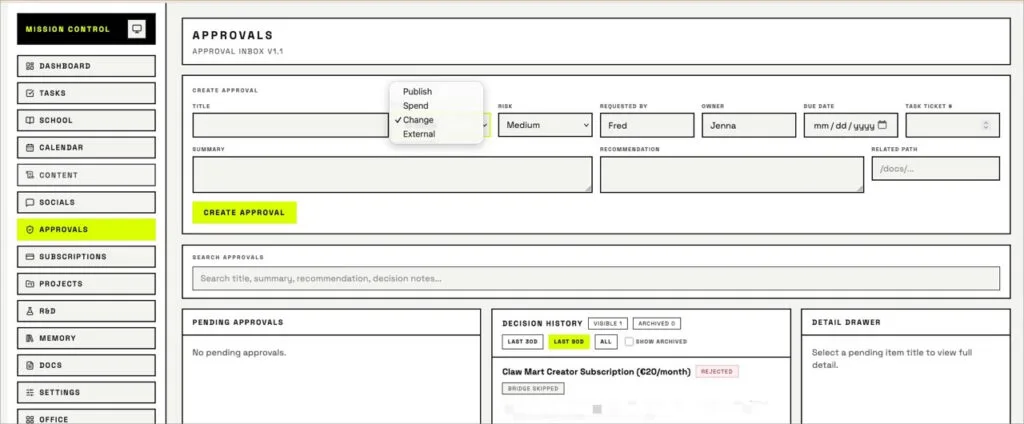
I use Convex as Mission Control’s real-time local data layer to keep tasks, agent activity, team information and project state synchronized so the dashboard always reflects what’s happening. Postiz was integrated for social media scheduling. And with Tailscale across all devices, I can access my Mission Control from anywhere. It’s honestly pretty awesome, and in a brutalist design that’s easy on my eyes, with light and dark mode, too.
The precise features are less important than having one reliable place to manage the work. That’s because before you start automating a process, you need somewhere to describe it, create a task for it, see its current state and record what happened.
Otherwise automation quickly becomes a collection of discombobulated jobs running in the background.
Yeah, I used agents to build it
I vibe coded Mission Control, and once I had the scaffolding in place, I automated parts of the further development process.
During the main build phase, Fred would review Mission Control, identify a feature that needed improvement or find a bug, and turn that into a scoped task he’d hand off to our engineering agent, who would work on it overnight. In the morning, I would find that a small feature had been added or a bug had been fixed while I slept.
Yes, sometimes I woke up to a colossal mess, but I chalked that up to being part of the learning process.
I soon found that the automated process worked best when a requested change was concrete and the scope was stable (see also my notes on agent maintenance). More ambitious autonomous night work was less dependable. If the starting assumption was wrong, the agents could spend hours making progress in the wrong direction, and burn through my token budget in the process.
To come full circle, the useful part was not simply that my agents could write code or do stuff without me. They could do that already. But it was Mission Control that gave them a shared system in which work could be proposed, assigned, tracked and reviewed in a way that a human can follow along. It introduced a layer of visual accountability where there had been none out of the box.
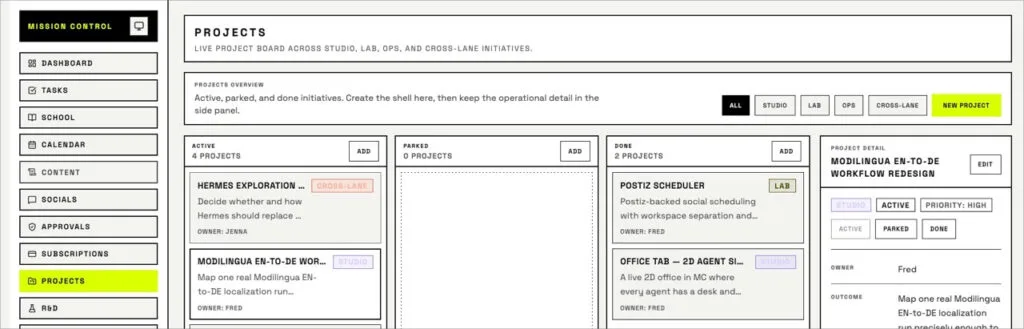
Five simple OpenClaw workflows to get started
Once Mission Control existed, the other automations had somewhere to live. Below are five examples of starter automations I still run and think are useful for anyone, regardless of what arena they’re working in:
1. Operational planning
My main agent Fred prepares a daily brief from current priorities, scheduled work and anything requiring attention.
Because he draws from Mission Control, the brief is connected to the work I have already decided to pursue. It doesn’t invent a fresh productivity system every morning.
2. Document and task triage
Incoming documents and random notes are all sorted into tasks on our Kanban board, or into the appropriate reference material buckets.
This is a narrow classification job with clear destinations, which makes it relatively reliable. It also reduces the chance that something requiring action disappears into a folder.
3. Research processing
When I save research and X bookmarks, Fred can retrieve the material, check for duplicates, summarize it, assess its relevance and file it by topic.
I receive a short practical takeaway, while the original source remains available in a searchable knowledge base (I far prefer using DevonThink over Obsidian as our KB). The automation reduces the amount of material I need to read and prevents useful research from becoming a forgotten bookmark collection.
4. Trend and opportunity reports
Scheduled reports monitor relevant developments in areas that interest me like AI, the future of localization and SEO.
Fred filters out most of the noise and turns promising signals into short opportunity or risk reports. The better ideas get funneled into our R&D section of Mission Control.
5. Structured R&D
Ideas added to the R&D hub can be assessed from several specialist perspectives.
The purpose is not to let agents make business decisions for me, but to take a contrarian position and challenge ideas before I spend time on them. It’s a council meeting of sorts, an agentic standup. They might come back with a grounded decision to reject a given idea, preserve it for later, run a small experiment, or turn it into a task and deliverable.
Whatever the case, Mission Control documents the agents’ meeting and its outcome, so the idea doesn’t need to be repeatedly rediscovered and reconsidered.
Why the operating layer comes first
The most reliable automations have clear inputs, defined outputs and limited room for interpretation.
But even a simple automation needs somewhere to report its result. You also want to know:
- whether it ran as scheduled;
- whether it failed;
- what it changed;
- whether it’s currently active;
- and who—or which agent—is responsible for it.
Having a Mission Control provides that visibility. I can see scheduled jobs in one place, identify failures and preserve automations I’ve paused without leaving them running or forgetting how they worked.
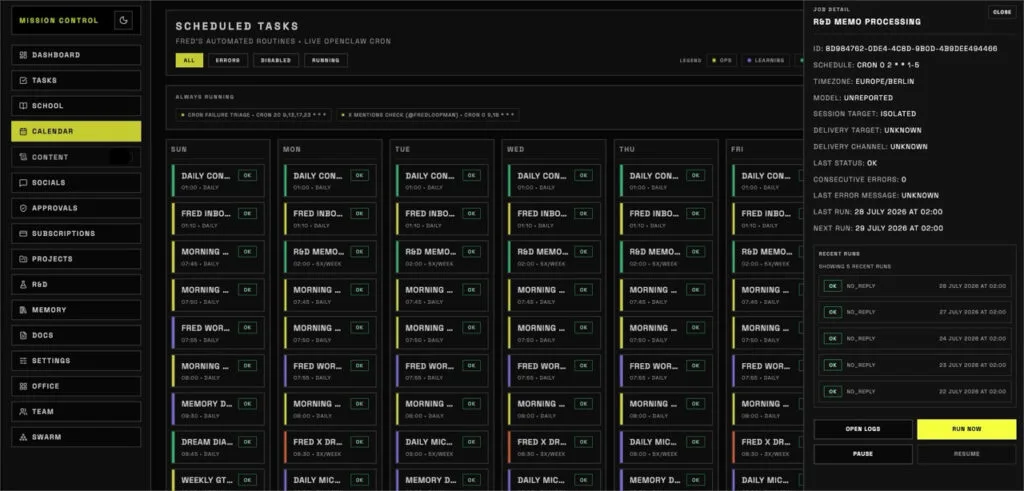
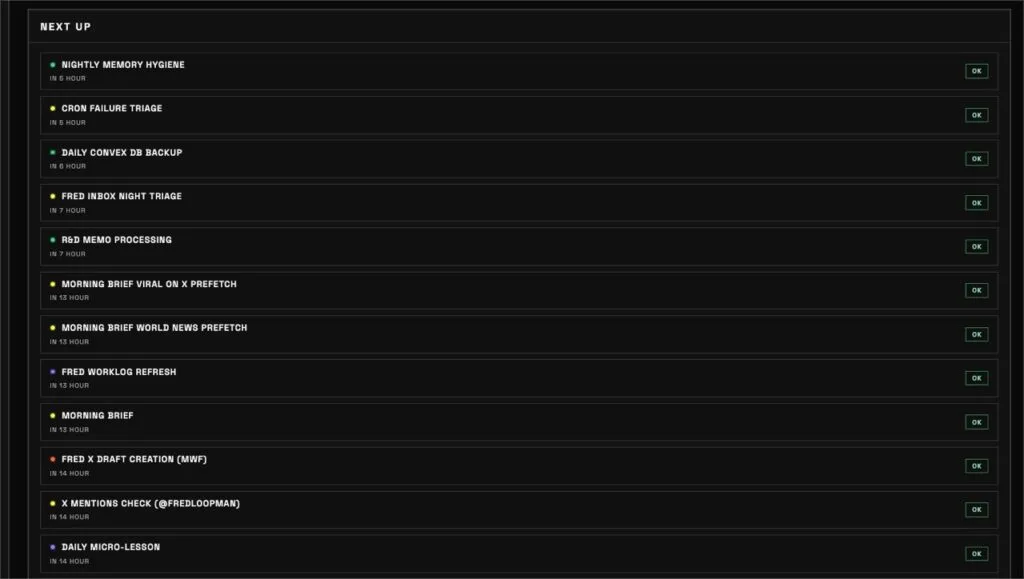
This became increasingly important as I added more agents and scheduled processes. Without an operating layer, the time saved by automation is too easily replaced by time spent remembering what’s been automated and diagnosing invisible failures.
What to build first in OpenClaw
Your Mission Control doesn’t necessarily need to be a custom application as comprehensive as mine. A small business could begin with one existing project-management tool, one database or one simple internal dashboard.
What matters is deciding what you need to see as a business owner or freelancer.
At minimum, I’d consider:
- a place to create and assign work to at least one agent;
- a record of active and paused automations;
- a clear view of scheduled processes and failures;
- somewhere to capture ideas, notes and research;
- and a review step before important actions are taken.
Only then would I start adding autonomous workflows.

AI Help for Small Businesses
Want to add AI to an existing workflow (content, localization, support, internal ops) or automate repetitive tasks?
Send a short note with your goal, current stack, constraints, and budget.
If you’re not sure where to start, you can also request a 1:1 AI orientation session.
My own system grew into a Kanban board, R&D hub, content planner, social scheduling system and agent operations dashboard because those were the functions I needed. Your business might need something entirely different.
And that’s my whole point: Mission Control should reflect how your day-to-day operates. You shouldn’t be trying to squeeze your personal processes into somebody else’s automation template or tool.
If reading this has made you want to explore what a Mission Control or a sensible first agentic workflow could look like for your own business, I can help you define and build it so that you don’t have to deal with an unnecessarily elaborate system. Get in touch if you’d like to have a chat!
- Credit to Alex Finn. It was his contagious enthusiasm for OpenClaw that got me hooked last winter, and watching him build out his iteration of a “Mission Control” gave me a lot of ideas for my own. ↩︎

Author
A localization consultant, writer, editor, and content strategist with over two decades of experience in tech and language ops, Jenna holds an M.A. in journalism and communication science from Freie Universität Berlin, and is a certified PSPO and PSM who loves helping startups and small businesses reach international users.