
The 47% statistic isn’t just a number; it’s proof of ubiquity. WordPress is the quasi operating system of the web. But out of the box, it’s monolingual. If you’re serious about scaling, building a multilingual WordPress website is the logical next step. Swapping words is the easy part; the real challenge is managing data structure, SEO, and user experience.
Many people get this wrong. They grab a Google Translate api script, slap it on their header, and call it a day. That’s a mistake. Overlays don’t create indexable content. To actually rank in new markets, you need a dedicated WordPress translation plugin. But with so many out there, which one should you pick?
This post looks at the best WordPress translation plugins currently available. I’ve either worked with or tested most of them out there and for the large part, they’re pretty awful. In this post I’m therefore only focussing on the best candidates that handle translation management correctly.
Why You Need a Dedicated WordPress Translation Plugin
Let’s backtrack for a second though. A translation plugin creates the infrastructure your site needs to survive Google’s scrutiny. Simple JavaScript tools just change what the user sees on the screen. They don’t change the source code. If the source code stays in English, you won’t rank in Spanish.
To get traffic, you need a multilingual plugin that generates unique URLs for each locale (like /fr/ or /de/). A dedicated plugin for WordPress also separates content from design. You can keep your layout intact while swapping out the strings.

Translation is also a compatibility game. A good WordPress multilingual plugin detects text inside your sliders, contact forms, and messy page builder code. And the best plugins handle this detection automatically, so that every piece of website content, from the footer to the checkout button, creates a seamless experience for international visitors.
10 Best WordPress Translation Plugins (Top 5 + Honorable Mentions)
My own websites including this one you’re on right now all run on WordPress. Coming from the localization industry, I’ve had my hands on pretty much every translation plugin out there. These are my top five contenders, followed by 5 alternatives to give you a holistic top 10.
1. TranslatePress (My Recommendation)
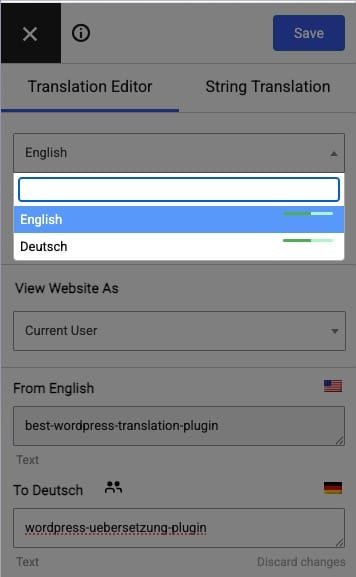
TranslatePress is my go-to here on the Modilingua site because it comes close to the CAT workflow professionals are accustomed to. It uses a visual interface that sits on top of your live site, so there’s no mucking about in the backend. Navigate to a page, enter translation mode, click a string, and edit it. It simply swaps the text strings dynamically when a user switches languages. That means you manage one page, and the plugin manages all the different language variations in the background.
It handles themes and plugins quite well, too. Because it looks at the front-end output, it can translate dynamic strings that some other plugins miss. The free version is ok for micro sites, but the pro version is where the SEO power lies.
For anyone who wants to translate their website themselves, TranslatePress is the plugin that offers the least friction in my opinion. It supports both manual translation and integration with machine translation services like DeepL.
2. WPML (An Industry Standard)
WPML is the oldest and most robust of the WordPress translation plugins. It’s the standard for complex WordPress multisite installations and massive WooCommerce stores. It allows for incredibly granular control. This comes at a cost though: it’s rather slow in my experience and will drag down your pagespeed rankings.
One thing that might be of interest for those looking for a one-stop shop solution is that WPML has the option to connect directly with over 70 professional translation services worldwide. This means you can send batches of content to translators right from one and the same dashboard. It also streamlines the translation process for agencies. It’s a premium-only plugin, but for enterprise WordPress multilingual setups, it’s a reliable heavy lifter if you know how to work around the pagespeed bloat.
3. Polylang (The Free Alternative)
Polylang differs fundamentally from the other tools in this list in how it structures data. It’s a free WordPress plugin that forces you to create a completely separate WordPress post for each language. For example, you don’t just translate your “About” page. You create a new, separate page for each additional language version. You then use the plugin to “connect” these two pages so the language switcher knows they are related.
It requires more manual setup because you are managing double the content entries. However, this keeps your database clean and distinct. Polylang is great if you want to translate content manually and prefer having total control over the structure of each language version.
4. Weglot (The SaaS Hybrid)
Weglot is a SaaS tool that connects via API to help you translate your WordPress site. Unlike the plugins above, it stores nothing in your local database; instead, it acts as a proxy that intercepts the page request and serves the translated version directly from their servers. It scans your site and delivers a first layer of automatic translation instantly. You then edit strings in their cloud dashboard, not your WordPress admin.
It’s the fastest way to translate a site, period. You can have a multilingual website live in minutes. However, it locks you in so that you can’t access your own translations if you ever want to leave, plus it gets very expensive indeed as your word count grows. I’m including in my top five picks regardless because the functionality is pretty ace, and if you have the budget, it’s a slick WordPress option for businesses that prioritize speed over ownership.
5. GTranslate (The Quick Fix)
GTranslate essentially wraps the Google language translator engine. It creates a dynamic overlay that translates text on the fly in the user’s browser. The paid version upgrades this mechanism by acting as a Google website translator plugin that creates a URL structure and hosts the translations on a server-side proxy to make them indexable.
It’s useful for rapid deployment where nuance isn’t critical. The quality of translation is purely algorithmic. It’s a decent translator plugin for very basic informational sites, but I wouldn’t use it for a brand or any other site that relies on precise tone and accurate translations.
The Rest of the Best
To round out the 10 best WordPress translation plugins, here are five other options that serve more specific niches rather well:
- Loco Translate: Excellent for developers needing to edit PO/MO files directly.
- MultilingualPress: Great for multisite networks specifically.
- Lingotek: Solid cloud-based translation management system.
- Google Language Translator: A basic, no-frills option.
- Translate WordPress with GTranslate: The free version of the tool mentioned above (non-indexable).
The i18n Factor: Why Some Text Won’t Translate
You might install a plugin only to find that specific buttons or headers remain in English, or even the entire WordPress theme and plugins themselves. This is typically an internationalization issue, or i18n for short.
WordPress i18n is the standard protocol developers follow to make their code translatable. If a theme author hardcodes text instead of using functions like gettext, your translation plugin can’t see those strings. The software looks for a specific tag called a text domain to identify which strings belong to which plugin or theme.
If your plugins and themes ignore the i18n process, you hit a wall. You can’t internationalize a theme simply by installing WPML or TranslatePress. You typically need to ask the developer to internationalize their code or fix the php files manually.
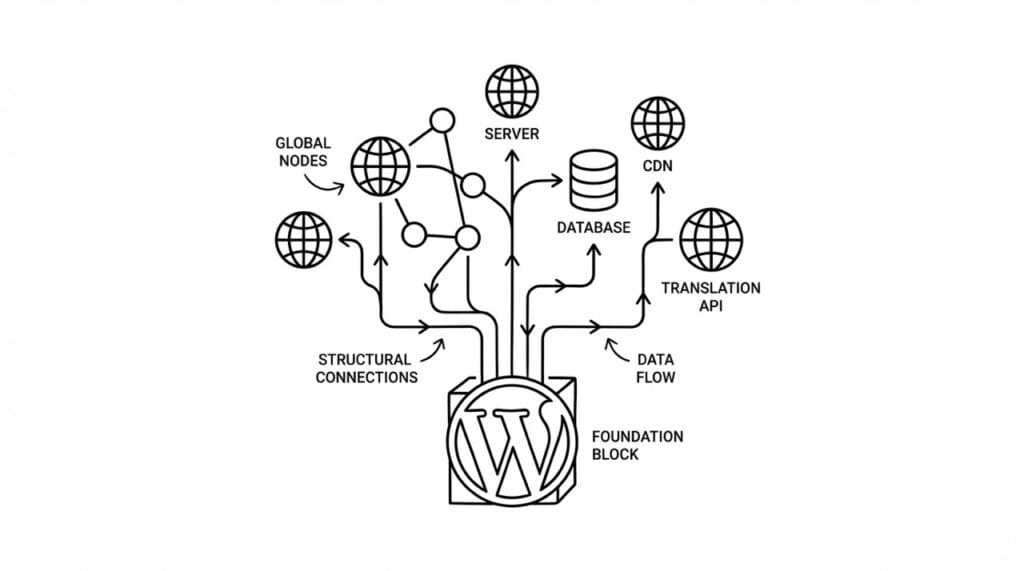
Modern sites also rely heavily on JavaScript. If the developer failed to use the wp.i18n library for their scripts, those dynamic elements will ignore translations. So before buying a premium theme, check if it claims to be “translation ready.” This confirms the dev did the work to internationalize everything correctly so your chosen translator tool will work as expected.
WordPress Localization: Translate Your Website Beyond Just Words
Translation swaps one word for another. WordPress localization, or l10n for short, adapts the entire experience. When a WordPress site is localized, currencies, date formats, and cultural context are all adjusted to match the user’s locale.
A standard EN-DE translation would change “Buy Now” to “Kaufen,” but a localized WordPress strategy involves making sure the checkout page accepts Euros and displays the date in e.g. the German format (DD.MM.YYYY).
Technically, this data lives in a PO file or POT file. In the past, you had to manage these files manually using tools like Poedit to create a translation file. Today, a modern localization plugin handles this complexity in the background, so the WordPress site can bet translated through a visual dashboard rather than editing a directory of files.
This affects SEO, too. Google rewards a fully localized WordPress website because it provides a better user experience. A robust plugin manages the technical signal (hreflang tags) to tell search engines which version of your site to show. Whether you manage multiple languages or just one language switch like I do on this site, the goal should be to localize the entire user journey, not just the text.
TL;DR Comparison of the Best WordPress Multilingual Plugins
Choosing the best multilingual plugin boils down to your priorities:
- For ease of use, TranslatePress wins in my book. The plugin comes ready to go, and it’s a great multilingual solution for small to medium-sized sites.
- In terms of scale, WPML is strong. If you have a massive directory, WPML offers the database optimization you need. It’s the best WordPress translation plugin for total control, but it does come with bloat.
- If budget is tight and your site is small, Polylang is great. As a free multilingual option, it’s powerful as long as you have the technical skills to configure it properly and don’t mind creating multiple instances of every page.
- Finally, when it comes down to speed, Weglot is a top contender. If you need to translate your site by tomorrow, have a big budget to blow, and aren’t bothered by being locked in, this is a top tier choice.
Automated vs. Human Translation
The best translation plugins now also support hybrid workflows. Machine translation isn’t perfect, but it can give you a great baseline to work with. You can use automatic translation to generate a first draft and save hours of work.
Machines miss context though. Human translation is thus still going to be non-negotiable for headlines, sales copy, and anything else that matters. A popular WordPress translation strategy is to use AI for bulk content (like product specs) and humans for your landing pages.
Tools like the Neuron to DeepL WordPress plugin or the Google Translate API integration in TranslatePress facilitate this. You generate bulk text, then hire a native speaker to refine it. This is a budget-friendly way to harness AI speed but still leverage human quality. It’s actually how I also handle all of the translations you see here on the blog.
Choosing the Best WordPress Translation Plugin
For most projects I encounter, TranslatePress is the pragmatic choice. It prevents the common headache of broken site layouts and allows for contextual editing, which saves time during QA. If you are running a massive legacy network or complex e-commerce setup, WPML remains the standard, though it introduces technical complexity.
Either way, the best plugin for your website is going to be the one that fits into your maintenance workflow, not the one with the flashiest marketing.
The actual installation is the easy part. The real work is maintaining strings as your content evolves. Whichever of the multilingual plugins available for WordPress you select, do your due diligence and make certain it suits your middle to long-term plans. Don’t treat translation plugins as a “set and forget” solution, because they’re not. They all require active management to create a multilingual WordPress site that functions professionally.
